

Google has now rolled out ‘Platform Properties’ in Search Console worldwide. This allows you to connect your external social media accounts (specifically YouTube, TikTok, Instagram, and X) and view Google Search data for your social posts in one place.
This global launch follows a beta testing period in December 2025 and a three-week rollout period, starting in early July.
Here is a clear look at what Platform Properties brings to the table and how it might support your digital strategy.
A quick primer on what Platform Properties in Search Console actually do
Platform Properties brings social and standard SEO performance closer together. Broadly speaking, these Search Console reports tell you four things:
- The terms people searched when your social content appeared on Google’s results page
- How your social content performs when it appears on Google’s search results (e.g. which posts or videos are gaining you the most traffic from Google)
- How many clicks your social content receives on Google - and how they’re distributed across Google Search, Discover, and News
- The country of users clicking on your social content
What it tracks: It only reports on how people find and engage with your social posts via Google Search, Google Discover, and Google News. It does not include any data from internal social app activity, and it is unrelated to your website content. Additionally, Google does not break down how or where on the SERP your social content appeared.
This is new data, as native analytics on social media platforms do not tell you what Google queries get your content featured in search results and when your traffic comes from Google.
Platform Properties are the second new Search Console reporting feature in recent history, following the release of AI performance reports in early June.
Related - AI visibility: What’s changed and what we’re doing about it
What can you do with Platform Properties data?
Platform Properties provides the following features for data analysis:
- Format comparisons: The ability to compare how long-form YouTube videos perform against Shorts, or regular Instagram posts against Reels in Google's index.
- A 24-hour filter: A short-term view designed to catch sudden spikes in search traffic to recent posts.
- Query groups: Automated clusters in the Insights report showing search themes that are trending up or down.
- Cross-platform exports: Allows you to export the data for each platform into a single spreadsheet.
- Annotations: Note the date you make a change to your post (e.g. a title, a caption, tagging, etc.)
See Google’s guide for more information.
These capabilities make it a helpful addition for assessing your social media strategy and how it interacts with your broader marketing.
Potential practical applications of Platform Properties data
Let’s take a look at some specific ways in which Platform Properties might benefit your digital strategy.
- Extending the lifecycle of evergreen content: Platform Properties can highlight when old social content unexpectedly regains organic search traction. For example, if a YouTube video or TikTok filmed two years ago starts spiking in Google Search due to a seasonal shift or news event, it could be a good time to pin it, film a follow-up, or re-share it across more channels.
- Testing title and caption changes: Using GSC’s annotation feature to mark the exact day you updated a YouTube title or TikTok description gives you a clean before-and-after benchmark for performance.
- Using search themes to guide topic planning: The query groups give you a broad insight into the sort of topics searchers are interested in. Making more videos in these areas could help to build impressions and clicks to your social channels, posts, or videos.
- Informing long-form YouTube strategies: For video-heavy brands, comparing how full-length tutorials perform against Shorts in Google Search offers real, actionable value for production planning, e.g.:
- Matching format to search intent: See whether Google searchers favour 60-second quick answers (Shorts) or 10-minute deep dives (long-form) for high-value terms, so you don't waste budget scripting a long video for a query that only triggers Shorts carousels.
- Spotting expansion opportunities: Identify top-performing Shorts that could signal high potential for a dedicated, long-form video on that same topic.
- Targeted CTR optimisation: Pinpoint high-impression, low-CTR long-form videos appearing on Google SERPs to refresh titles, thumbnails, or video chapter markers.
A caveat to be aware of
When optimising based on Platform Properties data, be mindful not to overly cater to Google at the expense of the social platform that hosts your content.
For example, Google suggests using its 24-hour filter to spot rising search terms, jump on them, and quickly tweak your captions or titles to tap into the trend.
While monitoring sudden traffic spikes is useful, what works for a structured Google search query may not always translate to better or sustained performance on the social platform in question.
How to set up Platform Properties in Google Search Console
If you have verified your Search Console account through a claimed Search Profile, your social handles will be added automatically, meaning data should already be available to view.
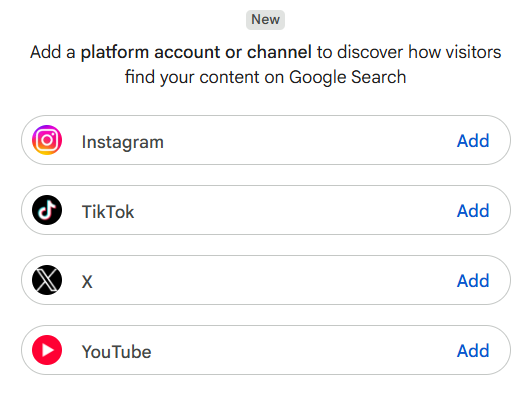
You can also set Platform Properties manually. Look for the menu pictured below in GSC to get started:
Source: Google
Important note - If your business works with a digital agency, your agency may not have the permissions to set Platform Properties up for you. We will be supporting all interested clients in implementing Platform Properties, and, where useful, will include this new data in our reporting.
What should you do next?
If your business relies on socials or even if you’re just curious whether the social content you do post gets any traction on and traffic from Google, it’s worth setting Platform Properties up. If your account is verified via a claimed Search Profile, you’re all set. If not, you can either do so, or set it up manually, which is a straightforward task if you have the necessary permissions.
If you're unsure how your brand is performing across the full search ecosystem, from traditional Google rankings and social visibility to AI answer engines, we're here to help. Contact us for an informal chat or to organise a free social media or SEO audit.