

We’ve classed most of the updates in this round-up as must-reads, which gives you an idea of just how big June is shaping up to be in Search. From Google’s May core update wrapping up to AI performance reports in Search Console, there’s plenty to discuss.
Updates are colour coded by importance:
🔴 Major developments likely to impact strategy
🟡 Worth watching or understanding
🟢 Informative - but lower impact for most
SEO
🔴 Google May 2026 broad core algorithm update now complete
Google’s latest broad core update finished rolling out on June 2. Judging by volatility alone, it made more significant adjustments than the March core update, which had an oddly stable rollout.
As is always the case with Google’s broad core updates, the given goal is to improve the quality of search results. Exactly how is up for debate, but some analysis suggests that the May 2026 core update could have, at least in part, focused on refining Google’s intent matching approach.
See a detailed rundown of the Google 2026 broad core algorithm update in our live guide to all of Google’s major updates.
🔴 AI performance reports and AI blocking toggle rolling out in Google Search Console
In what appears to be an effort to catch up with Bing, Google has begun rolling out what they’re calling ‘Search Generative AI performance reports’ in Google Search Console. We say ‘reports’, plural, because there is dedicated reporting for both Search and Discover.
For an overview of the sort of information these reports include, see our guide: AI performance reports in Google Search Console - what they do and do not tell you
Along with the reports comes a toggle that allows you to prevent your content from being used in Google’s AI features, such as AI Overviews and AI Mode.
Both the reports and the AI blocking control are currently only available to a small subset of UK websites, but a nationwide rollout is expected soon, followed by a global expansion.
The reason the UK is the first to see these features (the US usually gets priority) is that the UK Competition and Markets Authority (CMA) is the department actively pushing for more transparency and publisher controls.
For website owners…
More transparency from Google is always welcome, even if the reports don’t contain all the data we’d like to see. One of our concerns, however, is that Google could decide to retire rather than develop them, as was the case with SERP feature reporting in GSC.
Regarding the AI features control, the most important thing to know is that if you do decide to block the use of your content, it will not impact your organic performance in traditional Google Search.
However, the choice to use it requires careful thought. For most businesses, visibility in Google’s AI SERP features is vital to staying competitive, so it would be risky to opt out. For content-focused websites, there are potential benefits but only if your content offers unique value. This is what will support click recovery.
It may be a win in principle to block Google’s AI from using your content, but unless you offer something that your competitors don’t, users will still find the information in AI summaries. The only difference would be that your website is out of the running to secure a citation.
🔴 Google Business Profile insights coming to Google Analytics
Google is working on an upcoming Google Business Profile (GBP) integration with GA4.
Officially announced in Google’s June 4th ‘Small Business Bulletin’, the reporting will include data related to:
- Website clicks
- Calls
- Interactions
- Directions
- Messages
- Bookings
- Menus
For businesses…
This is a fantastic quality of life local SEO integration.
Connecting the dots between GBP interactions and website conversions can be complex; it’s something many businesses struggle with. But having all the data within GA4 should make it far easier to map the synergy between them.
In short - expect less manual tracking and more actionable insights.
Some details to know:
- When more than one GBP profile is linked, the report will show combined data - as opposed to separate data for each profile
- Data is limited to the previous 6 months of activity
- You’ll have to set the link up - Admin panel → Product Links → Google Business Profile → select location/s.
If you don’t see the option to set this link up yet, you can expect it soon. Your profile’s performance may seem underwhelming due to some engagement shifting from GBP to AI Overviews, but that doesn't mean your profile isn’t supporting your local SEO strategy. You can learn more about why in our guide: Are Google Business Profiles worth optimising in the age of AI?
🔴 Always-on search agents come to AI Mode - for a fee
Announced at Google’s I/O event in May, ‘Information Agents’ are now available to US users with Google AI Pro or Ultra subscriptions.
Many believe that search is heading towards ambient AI, or, in other words, always-on AI that completes tasks for users even when they’re not actively using search. And based on this new AI Mode feature, it could indeed be where things are headed.
Like any AI assistant, you provide these Information Agents with a task, but unlike standard AI assistants, Information Agents keep working on the task after the interaction is over. Users receive a notification with links and detailed information when the agent has an update for them.
For example, if you’re in the market for a used car, you can tell the Information Agent exactly what you’re looking for, and it will continuously hunt high and low for something that meets your specifications.
For website owners…
This is the closest we’ve come to an always-on AI assistant. Will it catch on? Well, Google Alerts didn’t go down that well, and Information Agents are essentially just a superpowered context- and intent-aware version of that.
If this new feature does become a popular search tool, open to non-paying users, it could have a big impact. For one, genuine human searches would go into decline.
Instead of continuous manual checks across multiple different online sources, users of this technology fire off one search, and then the agent takes over, scanning continuously.
As the agents take over the checking and comparing parts of search, brands will increasingly need to optimise for machines that evaluate their content.
Traffic will still be up for grabs via the notifications sent to users, but the question is… how does the agent choose which links to send on? If there’s only one suitable link, it sends that - fair. If there are two or even three, it presents them all for comparison. But what if there are 10+ viable options?
Understanding how the agents make their decisions will be key to optimising for traffic from notifications.
🔴 Zero-click searches becoming more common
The latest zero-click data from Rand Fishkin's Sparktoro (in concert with Similarweb) shows that zero-click searches are rising exponentially over time.
A zero-click search is when a Google search ends without the searcher clicking anything on the SERP.
According to the report, the UK has the highest rate of zero-click searches among the analysed nations:
- UK
- France
- Germany
- Italy
- Canda
- USA
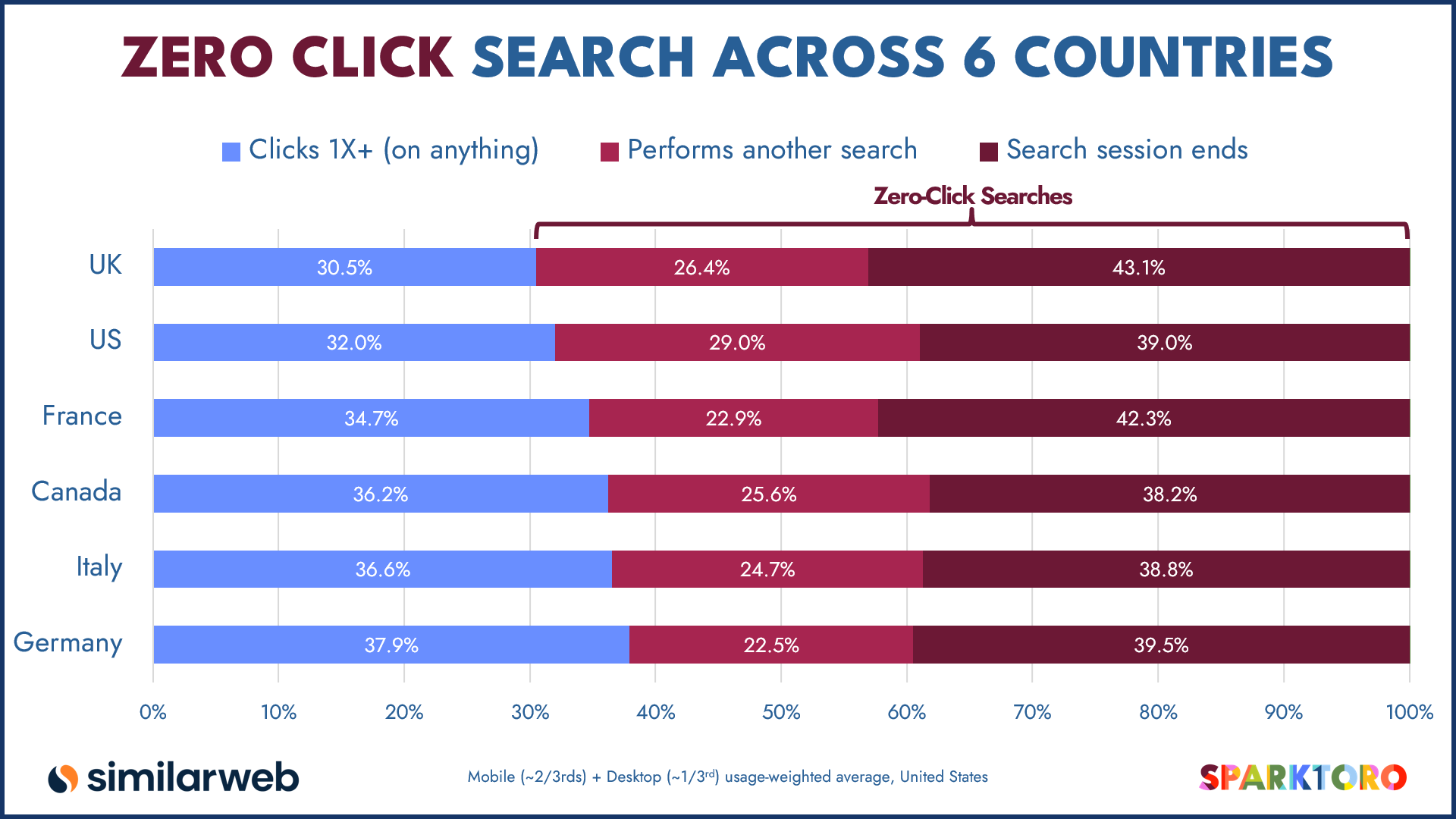
Source: Sparktoro
For website owners…
While this is a worrying trend (fueled mainly by Google’s AI Overviews), what’s reassuring is that if people aren’t clicking, they’re not looking for a solution - only surface-level information.
Business websites offering services and/or products are still well positioned to receive highly qualified clicks. AI cannot solve the problems you can - and, with the right support, it’s possible to buck the trend and thrive.
For content-based websites, it’s a more concerning situation, but ensuring your content offers something uniquely valuable may help to boost clicks from Google’s AI features. Or, if you choose to opt out of your content being used in Google’s AI SERP features, creating value-add content gives you the best chance of pulling in clicks.
🟡 Study shows potential reasons for Google review reply rejections
Sometimes Google review replies from businesses are rejected and deleted by Google. Businesses aren’t notified why or even that a reply has been rejected. But a new study of almost 13,000 rejected reviews sheds some light on the situation.
Key findings include:
- Average time between review and rejected reply was around 50 days
- Generic AI responses were likely the single biggest trigger of rejections
- Duplicate, low content replies get rejected
- Replies that use hashtags are rejected every single time
- 92.6% of rejected replies were responding to 5-star reviews - likely due to them being generic, low character count, and traceable as AI-generated.
- Google’s filter doesn’t differentiate between actual profanity and similar words used in non-profane contexts. For example, if a customer goes by Dick, mentioning their name in your reply will almost certainly result in a rejection. Even if there’s something that can be mistaken for profanity in your business name, and you use it to sign off your reply, it will be rejected.
For businesses…
Taken together, these findings provide clear direction for writing review replies that stick.
- Avoid AI reply tools - Google’s filter is adept at spotting generic AI phrasing. Enthusiastic responses feel particularly templated. So, unless the tool can be configured to generate specific, contextual, and varied language, whatever it comes up with will land straight in Google’s shredder.
- Reply earlier - As a business owner, you’re understandably very busy, but waiting too long to reply to reviews is a signal that you could be using automation to bulk reply to reviews amassed over time. If possible, reply within 24 hours.
- Don’t reply in bulk - Don’t schedule lots of replies to go out at the same time; this is an automation signal.
- Be sincere, and consider what it offers readers - Google wants review threads to be helpful for people considering your business, so generic replies, whether long or short, are likely to be rejected. Focus on details and offering a genuine response. Imagine if someone would find it helpful if they came across the thread.
- Avoid duplicate responses - Follow point 3. and this one handles itself. Giving the same response across multiple reviews is meaningless. Try to keep replies unique, even if only minor adjustments make sense.
- Don’t use hashtags - Google reviews aren’t designed to be leveraged like social media.
- Proof read for accidental “profanity” - A quick pass to make sure you haven’t mentioned anything that can be flagged as profanity out of context. Think like Beavis and Butt-Head - if it would make them laugh, it’s probably going to offend Google.
🟡 Google to enable linking of GBP and Gemini
Google is setting up an optional link between Gemini and your Google Business Profile. Gemini will then be able to support analysis and optimisation with full contextual knowledge of your business and profile - that includes offerings, customer reviews, customer questions, and profile performance data.
Strangely, one of the things Google suggests Gemini will be able to assist with is ‘engaging with customers by drafting replies to reviews’. But considering data shows that AI-generated review replies are regularly rejected by Google, it’ll be interesting to see how this goes.
For businesses…
This could be a helpful integration. You can ask Gemini for a performance summary for a given timeframe, and it should be able to give you immediate, accurate insight. You can also ask Gemini to update details on your profile, removing some manual maintenance from your workflow.
However, as is always the case with AI, human oversight is essential. If you need expert assistance optimising your Google Business Profile or improving your broader local SEO strategy, we can help. Explore local SEO support from TDMP.
Paid Media
🔴 Google testing healthcare ads in AI Mode (US only)
Google has begun testing healthcare ads in AI Mode. According to Google Ads Liaison, Ginny Marvin, it’s a ‘small’ test, and it’s only live in the US for English-language queries.
For advertisers in the healthcare space…
We’re going to keep an eye on how things progress from here, and we recommend healthcare brands do as well.
The contextual nature of AI Mode could potentially increase the relevance of ads served, which, in turn, could result in better quality leads. But it also means keeping a close eye on performance, compliance, and how your messaging is interpreted in AI Mode.
As with any new ad surface, it’s important to wait for hard data before strategising.
Need support with paid advertising for healthcare? TDMP is a Google Premier Partner PPC agency with a proven track record of driving exceptional results within highly regulated markets. Learn more.
🟢 New leads report in Google Ads
A new report is available in Google Ads, called Google-hosted form leads. Found in the ‘Conversions’ drop-down menu, it provides an overview of leads generated through forms hosted by Google.
“Forms hosted by Google” refers to lead‑generation forms that are built, displayed, and submitted directly on Google’s own surfaces — such as Google Search, YouTube, or the Google Ads lead form extension.
It gives you a breakdown by lead type, using the following categories:
- Raw leads
- Qualified leads
- Converted leads
- Lost leads
Additionally, it tells you the lead name, stage, date submitted, email, phone, and form contents.
For advertisers…
It’s helpful to have all this data in one place. It shows not just how many leads Google’s forms are generating, but how many are actually progressing, so you can spot wasted spend and tighten targeting without using multiple platforms.
Stay current with TDMP
Search is evolving at a pace, but the good news is that the tools, insights, and optimisation opportunities are finally starting to catch up. If you want clarity, direction, and a strategy built for modern search, we’re here to help. Let’s talk.
Explore our previous 2026 roundups:
In a hurry? Catch up on Q1 in Search quickly with our Marketing Matters guide. No deep dives - just essential bullet points for time-short marketers.